Flag This Hub

How to Stop Certain Friends from Writing on Your Facebook Wall

By


[Update]: The steps below are becoming outdated as Facebook continually changes its interface. Please refer to this video, which I found on YouTube, to be the most correct / up-to-date guide.

Many people wonder if it is possible to have a friend on Facebook but prevent him or her from writing on their wall. This is entirely possible, thanks to Facebook's fine-tuned privacy controls. You can have someone who is your friend on Facebook but does not have permission to post anything on your wall. You're probably wondering what the purpose of this is. Well, there are many reasons to stop a friend from writing on your wall. First, it could be because that person is annoying and is posting rude or inappropriate things on your wall. Or, it could be because that person got a virus and is spreading spam by posting on everyone's wall. (This happened to one of my friends recently: she used some application that posted spam links on all her friends, including my, wall) This can be done permanently, or temporarily, depending on the case, and is easily done and removed. So let's begin.

First, check out some other Facebook how-to guides:

The Privacy Controls

Deep down in Facebook's new privacy controls is a setting that controls who can post content on your wall. In case you need a refresher, that means they can go to your profile, and there is that little box at the top that they can comment in which will then show up for everyone to see. This control is rather hard to find, and fairly obscurely labeled, so many people have trouble finding it. I will explain how to find and activate it in one moment.

The One Drawback

Before I do, however, you should know one thing: by blocking someone from writing on your wall, you also prevent them from seeing wall posts other friends have left on your wall. For whatever reason, Facebook lumped these settings together under one control. So if you block them from writing, you also block them from seeing other people's posts. They will still be able to see your own posts and status updates though.

How to Do It

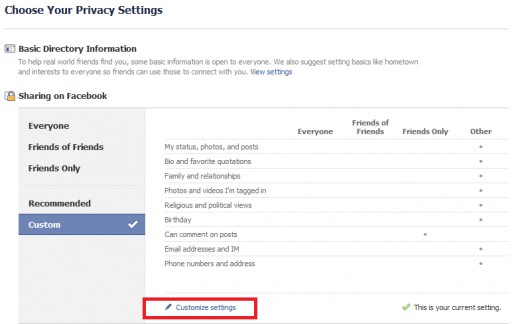
In Facebook, click on "Account," then "Privacy Settings." Then, near the bottom, select "Customize settings" as shown in the image below:
See all 5 photos

On the next page, look for an entry called "Things others share." Next to it, there is a title "Can see wall posts by friends." Now this is the confusing part: you'd never expect this setting to prevent them from writing on your wall, only that it would stop them from seeing the posts made by others. But the fact is, it controls both. Don't ask me why! Nonetheless, you will need to select the drop down menu next to it as shown here:
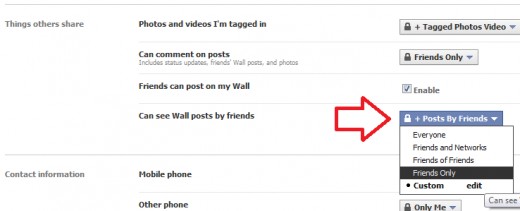
(Note, your menu may say "Friends Only" or "Everyone" depending on your current settings. Mine says "Posts by Friends" because of some list I made, but you can ignore that.) Click "edit" next to "Custom" near the bottom. Then, a new window will appear.
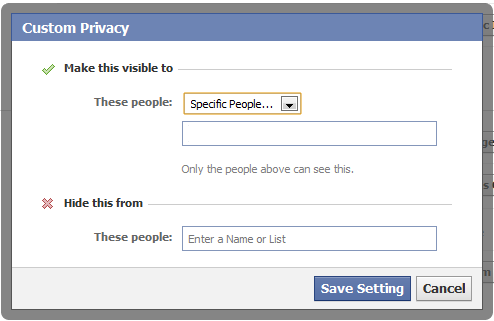
Next to "These People," you can leave it as only friends (Again, my picture is different because of a personal setting. Yours should say Friends Only.) But under "Hide this from," you can put the name of the person who you don't want to be able to make posts. Then, next time he or she visits your profile, there won't be a box for them to type in.
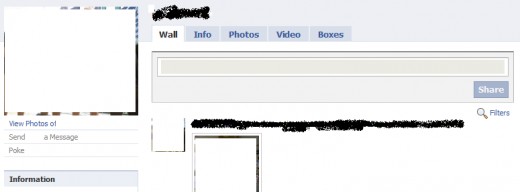
Facebook profile as seen by a friend WITH the ability to make posts.
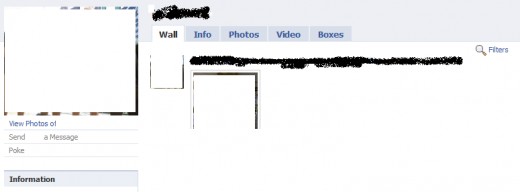
Facebook as seen by a friend WITHOUT the ability to make posts.

In the bottom photo, note the lack of the post box.

That's all there is to it. Be sure to check out the other guides for Facebook:


Tags: stopping friends from posting on Facebook, keep friend but prevent from posting, stopping friend from posting on Facebook wall, block friends from wall posts, hide wall posts from friends, how to prevent friends from posting on Facebook wall, how to block wall from friends on Facebook, how to stop friend from leaving wall posts, how to block my wall from Facebook friends, stop friends from writing on Facebook wall, prevent friends from writing on Facebook wall, block friends from writing on Facebook wall

Comments

Dave 22 months ago

Aggggh! This only stops a 'friend' from commenting on posts, not from posting things themselves, as I've just found out to my cost. shit.

xnotion 22 months ago

Are you sure you changed the right setting? This should stop them from actually POSTING to your wall.

Claire 22 months ago

brilliant, thanks so much. I've been scouring the internet to find out how to do this. Facebook help certainly doesn't tell you. It's the kind of thing you might or might not work out by accident. I find facebook really annoying like that, it's very difficult to control what you want to and how you want to, particularly as the controlling who can post is lumped in with who can see posts by friends. Always wonder what fb's agenda is in doing such things as I don't believe it's simply a detail they've overlooked.

Cheers again

Ari 22 months ago

Thank you very much. At first I thought u were just confused talking about the commenting on posts part, but luckily I read down until I got to the paragraph u mentioned that the one selection stops them not only from seeing other peoples posts on my wall but also from posting on my wall themselves.

renee 20 months ago

thanks so much! this was so helpful

Bman70 19 months ago

Wow you're an excellent technical writer, better than Facebook's entire tech team! Thanks for the clear, easy to understand article!

xnotion 19 months ago

Thanks for all the wonderful comments everyone!

demira 19 months ago

Thanks!! This was super helpful and you are an amazing technical writer!

demira 19 months ago

Just to let everyone know you should also make an exception to "Posts by Me" under "Things I Share." It's the first setting on the custom privacy settings page. Otherwise other people will be able to comment on your posts. The only drawback is that's a little more obvious because then the blocked person can't see your wall at all.

Paranoid 18 months ago

Do you know a way to prevent your friends from seeing comments in your photos from other friends, my privacy is extremely important for me, I don't want my friends to know my other friends and I have everything pretty well setup, one thing I haven't been able to do is preventing FriendX to see that FriendY liked my photo and commented on it, so now FriendX knows I have FriendY in my friends list :-(.

priyak 17 months ago

thank you sooo much this was soo helpful, i was so worried and stressed about this. i looked everywhere and didnt find anything about it.

your post was very helpful and detailed and the pictures!!! can't thank you enough.

thank you sooo much !

xnotion 17 months ago

Hi Paranoid,

there is no way to do that at the moment. Unfortunately, all of the comments and likes are visible to everyone. I don't see that changing in the near future because it could become a headache to manage.

And priyak,

I'm glad that I could help!! If you have anything else you'd like to learn, just leave a comment and I'll try to make a tutorial.

karan 16 months ago

hi this is nice

keepfacebookpersonal 16 months ago

Would this also stop people who've tagged you in pics to not appear on your wall? I read somewhere that you can't stop people from tagging you in photos/videos but if I can't stop them, at least, I can prevent the photos from being posted on my wall. I hate it when I'm tagged in photos for selling products. I'd like to keep facebook as personal as possible. I made the mistake of friending a seller.

awesomist 16 months ago

great post, really helpful!

Is there any way to stop certain people from being able to tag you in photos?

Teller 15 months ago

Now the question is, how do get Facebook to make this setting do what it actually says. Right above this setting, I have the box checked (enable) for the setting that says, "Friends can post on my Wall." I have the "Can see Wall posts by Friends" set to "Only Me". Like you said in your post xnotion, you would think this make it so friends could still post to my wall, but I would be the only person who could see those posts. But sadly no...it makes it so friends cannot post to my wall at all (even though that little "enable" box is checked right above it). What's the best way to let Facebook know about, and hopefully fix this issue?

jessie 14 months ago

THANK YOU!!! I've been trying to do this forever! you are the facebook jesus

tisoyprideofvalenzuela 14 months ago

tnx dude, it helped me a lot

Queen Claire Villacanas 14 months ago

Thanks this is very helpful. i though it wouldnt work..Thanks you very much...

Bobbin 14 months ago

If you do this, does it prevent them from also commenting on your photos?

Thanks though, great guide!

Fi 13 months ago

THANK YOU THANK YOU THANK YOU!!! :)

Sim 13 months ago

ZOMG!! THIS IS WHAT I WAS LOOKING FOR! A REAL ANSWER FOR ONCE!

POLICEMATRIX 11 months ago

Nice 1 friend :)

visitor 11 months ago

I know why they control both the fact other friends post ca bee seen AND the fact they can post too. it's not a good reason but it is: if they cannot post on yout wall and they see that others friends posted on it, they will understaind they are personaly blocked, resutling in an akward situation

told u, not a good reason

Scott 11 months ago

Wondering why you would want to friend someone who might post stupid shit on your wall. My take is just don't friend them.

Jen 11 months ago

THANK YOU SO MUCH! I've been looking everywhere trying to figure this out and you are the only person that has the right answer! You rock!

Zealot 11 months ago

I have a friend that I want to hide my posts from/not post on my wall but his name doesn't appear on the list of people I want to hide it from. Why is that? His name doesn't appear on the list and I have him added.

J-Dog 10 months ago

Thanks so much! Much better than the "help" section on facebook's page. This is EXACTLY what I wanted to find out. Thanks again!

Ben 9 months ago

When i try to block certain people from commenting (so i allowe "friends only" and block certain friends) it just block everyone from comment. Help?

Wadsy 9 months ago

If someone blocks you from commenting on their wall, even if they're your friend, does it stop you from commenting? Or can you just POST a comment on their status as per normal, only they cant see it?

jamie 9 months ago

can they stil comment on my status?

anne 8 months ago

I'm having trouble blocking specific people from commenting on my posts on the NEW facebook.. The privacy settings have changed and the only option i find is to block them from even seeing the posts.. by hiding them. : /

Dave 8 months ago

Have they changed it so you can no longer do this? ANNOYING!

Keith 8 months ago

Hey thanks so much, now I don't have my idiot friend posting dead horses on my wall any longer.

rain 8 months ago

hey! i want to know if how can i limit my friends to post on my wall. i want some of my friends not to have a chance to post on my wall..

max 5 months ago

That doesn't work anymore with the new facebook. When preventing some friends to see Posts by friends they can still post on my wall.... Any other genius idea?

Stan 4 months ago

Someone who is not a friend on Facebook wrote something about me how do I get it off

GBVish 4 months ago

Hi. Could you post a new, updated version of this? I think it's changed since Facebook introduced the timeline.

Thanks

John Smith 3 months ago

I think this is not working anymore, it was a few days ago but now all those people i had my wall blocked from are posting normally. I hope this gets fixed soon, if someones knows anything please let me know.

Coco 3 months ago

This doesn't work. I did the same thing and tested it on my friends account- they can still post if they want to

3 months ago

The video is incorrect, I just did this and the person was able to post on my wall.

2 months ago

I did what the video instructed me to do and it did not work.

peter 2 months ago

this definately does NOT work!!!

Welshie 2 months ago

How come my friend can see everything I comment on and that I 'like' but I can't see anything that they like or comment....... I've searched the privacy settings but have no idea how to do this.......

Florida wealth 6 weeks ago

Florida wealth,

Thinks giving to Oduduwa High Temple :Thank you thank you Dr

Oduduwa for what you have just done, for helping

me getting my husband who left me with two kids April last year to

me. Great Dr.Oduduwa bringing back my family i am great-full and

will always be

My name is Florida wealth i am from Uk i want to share my

happiness with the general public of what Dr.Oduduwa of Africa

has done for me in the last few weeks i was once in love this guy

called Mccatty we in love with each other until traveled out of my

state for two year and we promise ourselves to be together forever,

but before return from my journey he where now having another

lover when i try to come back to he. He told me i should go away i

love him so much that i could not let he go just like that then i told a

friend about it and she advice me and recommend this man Dr. Oduduwa for

me when i visit he at oduduwahightemple@gmail.com he only ask

me to buy some items for sacrifices to help me get my ex back and

he actually did it and it work well and today i am happy family

again. Rea you in the same problem or Are you wondering how to

get my ex back but all you can feel is pain and heart break? Have

your tried everything in your power to try and make your ex

reconsider their decision to but her or she doesn't even want to talk

to you? i advice he or she to contact this man today at

oduduwahightemple@gmail.com and with what he did for me i

believe he can also help you thank once again Dr.Oduduwa.

Florida wealth.

Submit a Comment
Members and Guests

Sign in or sign up and post using a hubpages account.


    Like this Hub?
    Please wait working